
ExpressJobs Job Search & Apply
Express Services, IncBusiness
3.5489.00 Reviews
- Version
- 1.0.32.0
- Installs
- 100.00K
- Age Rating
- Everyone
Screenshots




Our Review of ExpressJobs Job Search & Apply
 Analysis by Appyee
Finding work is often less about discovering one perfect job and more about keeping several small tasks under control: checking openings, applying before they disappear, remembering when a shift starts, and recording the hours you worked. ExpressJobs Job Search & Apply is built around that practical routine. I see it as a focused business app for people connected with Express Services, Inc, rather than a complete replacement for every job board or workplace system.
That distinction matters. The app is free, aimed at everyone, and has passed the one-hundred-thousand-install mark, so it is clearly used beyond a tiny group of testers. Its average rating sits at about three and a half, based on roughly one thousand three hundred ratings, which suggests a useful but uneven experience. After spending time with it, my view is straightforward: it can be convenient when your job search and work information fit the ExpressJobs workflow, but it is not the tool I would choose as my only employment app.
What I would consider before relying on ExpressJobs
Before I make this my main place for work details, I’d check that the openings and assignment process I need actually run through ExpressJobs. I’d also try the schedule and time-entry steps before a busy week, so I know what to expect when a shift changes or ends. That practical check leads to the situations where the app earns its place most clearly.
Start with your actual work routine
The first question is not whether the app has a long feature list. It is whether it matches the way you look for and manage work. ExpressJobs brings job searching, applications, scheduling, and time entry into one place. That combination is more useful for someone moving from candidate to active worker than for somebody who only wants to browse vacancies occasionally.
For example, imagine I am looking for warehouse, office-support, or temporary work and find an opening through ExpressJobs. I can use the same app as my work situation develops, checking a schedule and entering time instead of switching immediately to a separate collection of tools. That continuity is the main reason I would try it. A general job board may offer broader discovery, while a standalone timekeeping tool may handle hours more deeply, but ExpressJobs connects the two stages in a way that feels practical.
I would also consider how frequently I need to use it. If I apply for one job every few months and already have a preferred job-search service, the extra app may not add much. If I regularly accept assignments, check shifts, and submit working hours, the value becomes clearer. The app is strongest when it is part of a repeated routine rather than a one-time search.
Think about access and device compatibility
ExpressJobs is available as a free Android business app from Express Services, Inc. It supports Android 6.0 and later, which makes it accessible on many older phones as well as newer devices. That is helpful for workers who do not replace their phone often. I would still check the operating system on an older handset before planning to depend on it, especially if the phone is used for work every day.
The current version is 1.0.32.0. I would keep the app updated when possible, not because a version number guarantees a particular experience, but because work-related software benefits from receiving maintenance changes. A schedule or time-entry tool is not something I want to test for the first time just before a shift begins.
The Everyone content rating also makes the app approachable for a broad audience. In practical terms, the more important issue is not age suitability but whether the jobs and employment process available through the app fit my location, skills, and expectations. A clean installation does not automatically mean that every user will find the same opportunities.
Separate job discovery from job administration
One useful way to judge this app is to divide its purpose into two parts. The first is discovering and applying for work. The second is handling work after an application leads somewhere. Those parts have different standards.
For job discovery, I want enough relevant information to decide whether an opening is worth my time. I also want an application process that does not make me repeat the same details unnecessarily. For job administration, I care more about finding my schedule quickly and entering time accurately. ExpressJobs makes sense because it addresses both needs, but that does not mean it replaces every specialized alternative in either category.
My advice is to install it before you urgently need it. Explore where the job-search area sits, understand how the schedule is presented, and become familiar with the time-entry path. That small preparation can prevent a rushed search through menus when you are standing outside a workplace or trying to remember hours at the end of a long day.
Where ExpressJobs is most useful
I find ExpressJobs most useful when a job search can turn into an ongoing work routine, rather than ending with an application. Keeping the next shift and the time-entry task within the same workflow can make it easier to act while details are fresh. The key is using it as a regular checkpoint, not just opening it when I need to find another job.
One app can follow the shift from applicant to worker
The strongest idea here is continuity. Many employment apps stop at the application. Once someone is hired or assigned, the worker may be directed to a different scheduling or payroll-related system. ExpressJobs keeps job search, schedule viewing, and time entry within the same general experience.
I find that especially valuable for people who work variable assignments. A changing schedule creates small risks: missing an update, forgetting which day belongs to which assignment, or delaying a time record until details become unclear. Having the schedule and time-entry functions close together encourages a simple habit: check the next shift, work it, then record the hours while the information is fresh.
That workflow is more important than it may sound. A paper note can be lost, a message can be buried, and a calendar may show when a shift begins without giving me a natural place to record what I actually worked. ExpressJobs is not merely a search shortcut in this context; it can serve as a central point for the employment process handled through the service.
It suits people who prefer a direct, task-based experience
I would recommend trying ExpressJobs to someone who wants a work app to answer a few immediate questions: What opportunities can I apply for? What shifts are on my schedule? Where do I enter my time? The store summary points to exactly those tasks, and the app’s appeal comes from keeping them visible rather than surrounding them with unrelated social or career content.
This focus may also help users who are not interested in building a public professional profile. Some large employment platforms encourage networking, profile polishing, employer research, and ongoing content browsing. Those features can be helpful, but they can also make a simple search feel like a second social network. ExpressJobs feels better suited to someone who wants to move from opportunity to application and then manage the practical details.
There is a useful trade-off here: less distraction can mean less breadth. I would not expect a focused staffing app to provide the same sense of the entire labor market as a broad employment marketplace. For a person looking for work through Express Services, Inc, that narrower scope may be exactly the point.
A realistic everyday workflow
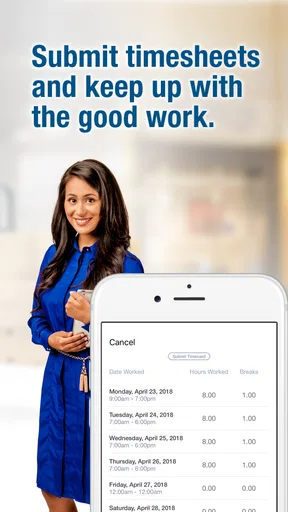
Suppose I have finished a temporary assignment and want another opportunity. I open the app, review available jobs, and apply to the ones that match my availability. If an assignment follows, I return to the same app to check the scheduled time. After the shift, I enter the hours rather than relying on memory at the end of the week.
The practical tip is to treat the schedule view as a planning tool, not just a last-minute reminder. I would check it when arranging transportation, childcare, or another job. If something looks different from what I expected, I would resolve that before leaving home instead of assuming the old information is still correct.
A second tip is to record time immediately after work whenever possible. This reduces the chance of mixing up start and finish details across several shifts. The app’s value depends partly on that discipline: it can provide a place to enter time, but I still need to enter accurate information and review it before submitting.
Its established presence is reassuring, but not a guarantee
With more than one hundred thousand installs and hundreds of written reviews, ExpressJobs is not an unknown experiment. That level of adoption gives me more confidence than an app with no visible user history. At the same time, the average rating of around three and a half tells me to keep expectations measured.
I read that combination as a sign of a functional app whose usefulness may depend heavily on individual circumstances. Someone whose employment process is already connected to ExpressJobs may find it essential, while a casual job seeker may see fewer reasons to return. Ratings in this range also remind me to allow time for learning the workflow and to keep a backup way of remembering shifts and hours until I am comfortable.
Small habits make the app more dependable
I would use a consistent review routine. After opening the app, I would check whether a new schedule item affects my plans, then look at any pending employment task, and finally confirm that recently entered time appears as expected. This is not glamorous, but it turns the app into a reliable checklist instead of something I open only when a problem has already appeared.
I would also avoid entering hours while distracted. Time entry is one of those tasks that appears simple but becomes troublesome when I am rushing. A quiet minute, a quick comparison with my own notes, and a final review are worthwhile. If I worked across different assignments, I would pay particular attention to selecting the correct work context before recording time.
These habits are not extra features, and I would not mistake them for automation. They are ways to get more value from the app while recognizing that the user remains responsible for checking important work information.
Where another type of app may fit better
I’d choose a different tool when the main need is broad career discovery, detailed employer comparisons, or complex team scheduling. Those jobs call for a wider marketplace or a more specialized system, while ExpressJobs is most compelling for work connected with its own employment workflow. That distinction also helps clarify what switching would really ask of me.
Broad job boards are better for maximum variety
If my priority were to search across many industries, employers, and locations, I would begin with a broad job marketplace rather than rely on ExpressJobs alone. A general platform is usually the better first stop for someone changing careers, comparing salary ranges, researching employers, or searching internationally. Its strength is breadth and discovery.
ExpressJobs makes more sense when the opportunities and employment steps connected to Express Services, Inc are relevant to me. I would use a broad job board alongside it if I wanted to compare the wider market. That is not a criticism; it is a difference in purpose. The focused app can be convenient for a particular work channel, while a general service can provide a larger window onto available jobs.
Dedicated scheduling tools may suit complex teams
For a worker who only needs to see a schedule connected with ExpressJobs, the built-in approach is convenient. For a manager coordinating a large team, several locations, shift trades, detailed availability rules, or extensive reporting, a specialized workforce-management system may be more appropriate. I would not choose ExpressJobs as a substitute for a full operations platform without first confirming that it covers the organization’s administrative needs.
The same distinction applies to time tracking. ExpressJobs is attractive when time entry is one part of a staffing workflow. A dedicated timekeeping product may be a better fit for someone who needs sophisticated project allocation, multiple clients, detailed reports, or broader personal record-keeping. I would avoid forcing one app to handle a job-management problem it was not designed to solve.
Paper notes and phone calendars still have a role
It may sound old-fashioned, but I would keep a simple personal note of scheduled shifts while learning ExpressJobs. A calendar reminder can help with travel time, and a short record of hours can make it easier to notice a mistake before submitting time. These tools should not replace the official workflow, but they can protect against forgotten details.
This is especially sensible for anyone whose phone battery, mobile connection, or device access is unreliable. An app-centered routine works best when I can open the app at the moment I need it. If that is not consistently possible, I would use a backup method and update the official record as soon as I can.
What the app does not solve by itself
ExpressJobs can organize actions, but it cannot make an unsuitable job suitable. I still need to read the requirements, consider transportation, check the schedule against other commitments, and understand what is expected before applying. I would also avoid assuming that seeing an opening means it will remain available long enough for a delayed application.
That is why I would not judge the app only by how quickly I can tap through an application. The better measure is whether it helps me make informed choices and then manage the resulting assignment. If I want detailed career coaching, extensive employer research, or a full professional identity, I would use additional resources rather than expect this app to provide everything.
The real cost of switching to this workflow
The app itself is free, but moving a routine into it still takes a little attention: I’d need to learn where to check shifts and enter time, then make those checks part of my workday. I’d keep a calendar reminder or brief personal note during the transition rather than assume one new app immediately replaces every backup. Once the routine feels dependable, I can decide which duplicate steps to drop.
Installation is free, but attention is still a cost
There is no purchase price to create a financial barrier, which makes trying ExpressJobs easy. The more meaningful cost is attention: learning where information appears, remembering to check schedules, and building a habit around time entry. For a person already using several job and work apps, adding one more place to monitor can create friction instead of reducing it.
I would therefore ask whether ExpressJobs replaces an existing step. If it combines a job-search channel and a work-management task I currently handle separately, the switch may simplify my routine. If it only duplicates a schedule already sent through another system, I may gain little. Free does not automatically mean effortless.
Keep your own transition checklist
When starting, I would write down the few things I need to verify: whether my relevant opportunities appear, where the schedule is found, how a time record is entered, and how I can review what I submitted. This gives me a practical test instead of judging the app after a quick glance.
I would also use the first few work periods as a trial phase. I would compare the schedule with any official communication I receive and retain personal notes about hours until the process feels dependable. If the app fits, those backup notes can become less important. If it does not, I will know early rather than discovering the problem after several shifts.
Know when not to switch completely
I would not abandon a reliable general job board just because ExpressJobs is free. Nor would I discard a calendar or personal time record until I understand how the app fits with my employer’s process. The sensible approach is gradual: use ExpressJobs for the tasks it handles well, then reduce duplicate tools only after the workflow proves comfortable.
This gradual approach also answers a common concern about convenience. Yes, having search, schedule, and time entry together can reduce app-hopping. But if I need opportunities outside its employment network, a broader service remains necessary. The best setup may be a combination, not an all-or-nothing replacement.
My recommendation for the right kind of user
My recommendation is to try ExpressJobs when your work is connected to Express Services, Inc and you want one place for applications, schedules, and time entry. Its free access, broad age rating, support for Android 6.0 and later, and practical focus make it easy to test. I especially like the way it can stay useful after the job search ends; that is more valuable than another app that only collects applications.
I would recommend it most strongly to temporary workers, applicants who expect to manage assignments through the same service, and people who prefer a direct task-based app over a large professional network. The best results will come from checking the schedule proactively, recording hours promptly, and keeping a small personal backup while learning the routine.
I would be more cautious if I were searching across many unrelated employers, comparing a wide range of career paths, or managing complicated team operations. In those cases, a broad job marketplace or specialized workforce tool may deserve a central role, with ExpressJobs used only when its specific employment workflow applies.
After weighing those trade-offs, I see ExpressJobs Job Search & Apply as a useful companion rather than a universal job-search solution. Its modest rating means I would approach it with realistic expectations, but its focused combination of employment search and day-to-day work tasks gives it a clear purpose. If that purpose matches your situation, installing it is a sensible low-risk step. If it does not, the app is unlikely to replace the broader tools you already use.
Verdict
Strengths of ExpressJobs Job Search & Apply
- Searches jobs across multiple industries and experience levels.
- Quick-apply options can save time during the application process.
- Job listings are organized with clear role and location details.
- Useful filters help narrow results by salary, distance, and job type.
- Convenient alerts can notify you when matching vacancies appear.
Limitations of ExpressJobs Job Search & Apply
- Some listings may redirect you to external sites to finish applying.
- Job quality and accuracy can vary between employers and sources.
- Frequent notifications may feel excessive without careful settings.
- Advanced search or application features may require account creation.
- Availability of jobs and features can differ by country or region.
Similar Picks in This Category
View All
LinkedIn: Community & Network
LinkedIn3.8

Zoom Workplace
zoom.com4.1

Microsoft Teams
Microsoft Corporation4.6

Meta Business Suite
Meta Platforms, Inc.4.6

Webex Meetings
Cisco Systems, Inc.4.5

TeamViewer Remote Control
TeamViewer4.4
Frequently Asked Questions
What is ExpressJobs Job Search & Apply, and who is it designed for?
ExpressJobs Job Search & Apply is a mobile job-searching tool intended to help users discover employment opportunities and manage the application process from a smartphone. It may be useful for people looking for full-time, part-time, temporary, entry-level, or industry-specific positions. Before downloading, remember that available jobs, employers, and search features can vary depending on your location and the information provided in your profile.
How do I search and apply for jobs with ExpressJobs?
After opening the app, users can generally search for vacancies by entering keywords, job titles, locations, or other preferences. Job listings typically provide details such as responsibilities, requirements, schedule, and employer information. Depending on the vacancy, you may be able to apply directly through the app or be redirected to another website. Carefully review each listing and confirm that your résumé and contact details are accurate before submitting an application.
Does ExpressJobs Job Search & Apply require an account?
Some features may be available without registration, such as browsing or searching job listings, while applying, saving vacancies, receiving alerts, or tracking applications may require an account. Creating a profile can make repeated applications more convenient, but you should check what personal information is requested before signing up. Use a strong, unique password and review the app’s privacy policy to understand how your résumé and contact data may be handled.
Is ExpressJobs Job Search & Apply free to download and use?
The application may be free to download, although availability of premium functions, advertising, optional services, or third-party application processes can depend on the current version and your region. Always check the Google Play Store or Apple App Store listing for pricing, subscriptions, and in-app purchase details before installing. Be cautious of any employer or service that asks for payment simply to submit a standard job application.
What should I check before trusting a job listing in the app?
A job-search app can make finding vacancies easier, but users should still verify every opportunity independently. Check the employer’s official website, confirm that the contact address and company details are legitimate, and be cautious about unrealistic salaries, urgent requests, unpaid training fees, or demands for banking and identity information before hiring. Never send money to obtain a job, and report suspicious listings through the available app or platform channels.
